AXIOM 16-P
A drum synth that builds its own sounds.
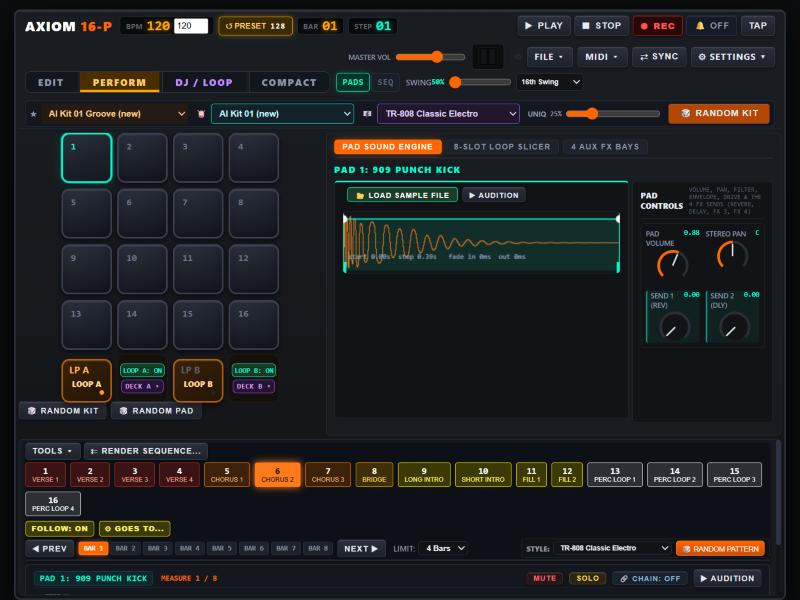
A 16-pad drum machine, step sequencer and loop slicer that runs in your browser. It ships with no sample files: every kick, snare and hat is synthesized on your computer from a recipe.
Free. No sign-up. Opens in a new tab. Works best in Chrome or Edge.
How it makes its own sounds
Most drum machines are a folder of recordings. This one is a synthesizer, so there is nothing to download but the app itself (about 6 MB, manual included).
Settings, not recordings
Each pad stores a recipe: oscillator pitch and pitch drop, noise, filter, decay and drive. Change a knob and you change the sound at its source.
Built the first time you use a kit
When you pick a factory kit, the app renders it from its synth settings. It takes about a second per kit, and the result is kept so the next time is instant.
You choose where it lives
On first start it asks where to keep what it makes: pick a folder on your computer (an AXIOM Data folder is created inside it) or use the browser's own storage.
Getting started
- Launch itPress the orange button above. Chrome or Edge on a computer works best.
- Pick your folderChoose a folder when it asks where to keep your kits, loops and sequences, or choose the browser's own storage. You can bring this folder to another computer.
- Make a beatChoose a kit from KIT PRESET, press PLAY, then try RANDOMIZE KIT. Click steps in the sequencer to build a pattern, or play the pads from your keyboard.
Your music stays with you. This website only delivers the app. Your kits, loops and sequences are saved to the folder you pick on your own computer; nothing is uploaded.
Choosing a folder works in Chrome and Edge on desktop. In other browsers the app keeps its data in the browser's own storage instead.
What makes it different
There are plenty of drum machines. These are the things that set this one apart.
Pure synthesis
Every factory sound is generated, so kits are tiny, never repeat a stock sample, and can be reshaped from the inside.
Synth, sampler, additive
Switch any pad between a subtractive drum synth, a sampler for your own sounds, and an additive synth with up to 24 sine partials.
Turn a recording into a patch
Convert a sample to additive: the app analyses its spectrum, picks out the strongest resonances and rebuilds it as a playable synth, with sliders for clarity, punch, low end and length.
Randomize with intent
Randomize a pad or a whole kit using more than 30 sound recipes, from kicks, snares and hats to claps, toms, gongs, swooshes and impacts. Every roll is a new sound.
Light on your CPU
Bake any synth pad into a sample for playing live, then switch it back to the synth to keep editing. Perform mode is several times lighter than full editing.
Feel, not just steps
Per-step velocity, micro-timing, flams, ratchets and ghost notes, 8 scenes, 16 patterns you can queue live, and swing from 50% to 75%.
What is inside
- 16 drum pads plus a loop slicer pad, all playable from the keyboard.
- 42 factory kits covering techno, trip hop, synthwave, lo-fi, vintage 808 and 909 styles and more.
- 4 aux effect bays (reverb, delay, modulation, dynamics and EQ, drive and bitcrush) and a master bus with compressor, reverb and tape delay. Delay and modulation can lock to the tempo.
- 8-slot loop player with pitch-preserving time-stretch to your BPM and a transient slicer that exports any slice to a pad.
- MIDI learn for pads, knobs, sliders and buttons, plus MIDI clock in and out, and MIDI file import and export.
- Hardware controllers: split pad and step layouts for AKAI APC and Novation Launchpad with live LED feedback.
- Two DJ decks that play your rendered loops or songs.
- Works offline after your first visit, and exports audio as WAV.
- Low-CPU switches to turn off pad groups and effects on slower computers.
Play it from your keyboard
The pads are laid out as a 4×4 grid on your keys. Space starts and stops the sequencer.
Ready to play?
It opens in a new tab and asks for a folder the first time.
Launch the drum synth ↗